Symmetry Domer
Design geodesic domes with as few different strut lengths and panel types as possible, for a tolerance that scales with the size of the dome.
Features
Three base solids
Icosahedral, octahedral and tetrahedral domes of any class and frequency (m, n), cut at any height h/D.
Few strut lengths
Merges lengths within a tolerance given in millimetres or as a fraction of the diameter, then moves the joints so that more struts become truly equal.
Few panel types
Choose fewest strut lengths or fewest triangle types, keeping the whole symmetry group, only the dome axis, or none.
Dual domes
Hexagon and pentagon panels made flat, with their strut lengths merged.
Scan the families
Tabulates many candidates, adds point sets from the Mechanical algorithms, and picks the champions and the Pareto front.
Reports and files
PDF report with drawings, strut and panel lists; joints saved for Symmetry Explorer; stereo views, gamepad and a command line for scripting.
What it does
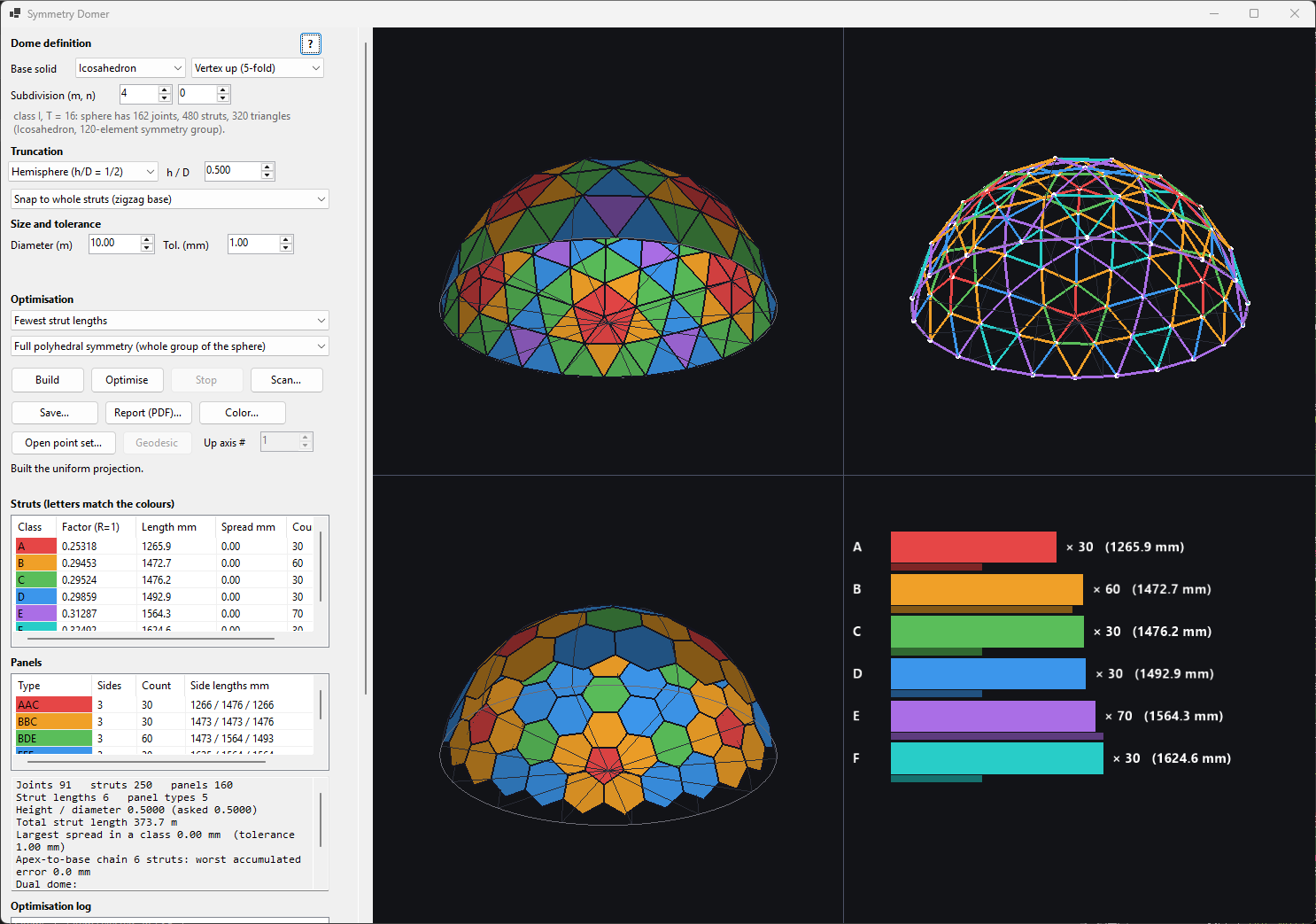
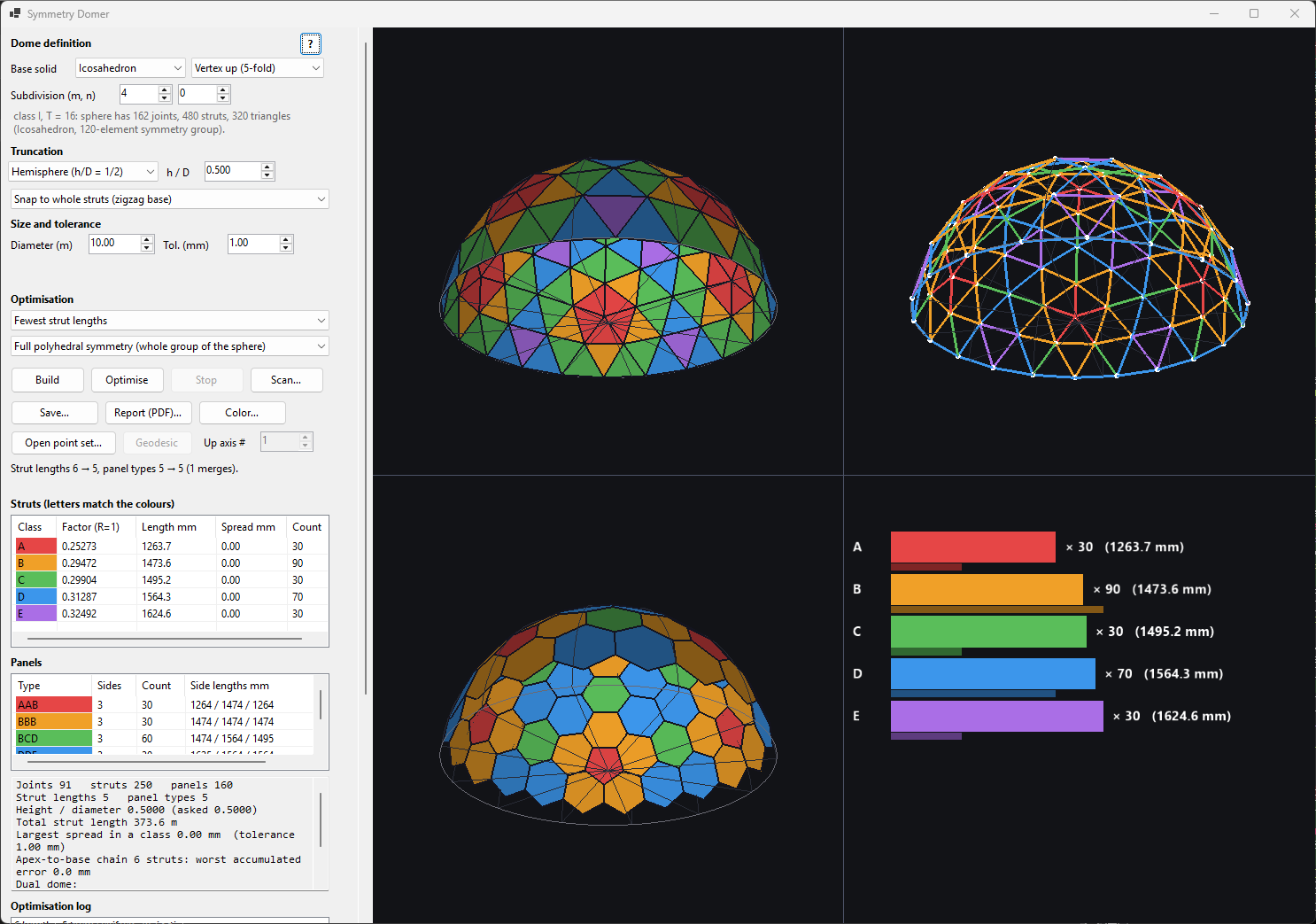
A geodesic dome is a subdivided Platonic solid (tetrahedron, octahedron or icosahedron) projected onto a sphere and cut off at a given height. A plain projection gives many slightly different strut lengths (a 4V icosahedral dome has six). Domer merges lengths that differ by less than the tolerance, and then moves the joints so that more struts become truly equal, keeping the dome as round as the symmetry allows.
Building a dome
- Base solid / axis up – which polyhedron and whether a vertex, face or edge points to the zenith.
- m, n – the subdivision lattice vector. Class I is (m,0) (frequency m), class II is (m,m), class III is any other (m,n); the triangulation number is T = m² + mn + n².
- Build computes the joints, struts and panels, groups equal struts into lettered classes and fills the lists. Colours in the lists match the colours in the 3D view.
Truncation
The truncation is set before the run by the ratio h/D (height of the dome divided by the diameter of the sphere). Presets: 0.5 hemisphere, 0.625 (5/8 sphere, taller), 0.375 (3/8), and free entry.
- Snap to whole struts keeps only complete triangles above the cut, so the base is a zigzag line of joints. Every strut is a full chord, which keeps the class count low. The achieved ratio is shown next to the requested one.
- Exact plane cuts at the exact height and trims the struts (flat base, extra base strut lengths).
Tolerance
The tolerance is entered in millimetres for a given diameter or as a fraction of the diameter; the two are linked. 1 mm on a 10 m dome is 1×10⁻⁴ of the diameter, and the same relative value is used on any other size. Struts form a class by complete linkage: every member of a class is within the tolerance of every other member, so classes cannot creep (A≈B≈C but A≉C). The report lists the largest spread actually found and the worst-case accumulation along the longest apex-to-base chain of struts.
Optimising
Choose the objective: fewest strut lengths or fewest triangle types. Symmetry option: Full keeps the whole symmetry group of the base solid, Dome axis keeps only rotation about the vertical axis, None lets every joint move freely (most reduction, least regular dome). The optimiser repeatedly merges the two closest classes, solves for joint positions that realise the merge (Levenberg–Marquardt, joints constrained to the sphere, base ring planar) and accepts the step when the dome stays valid. The log shows each step; Stop ends the run with the best state so far. This is a greedy heuristic – it does not prove minimality.
Dual dome
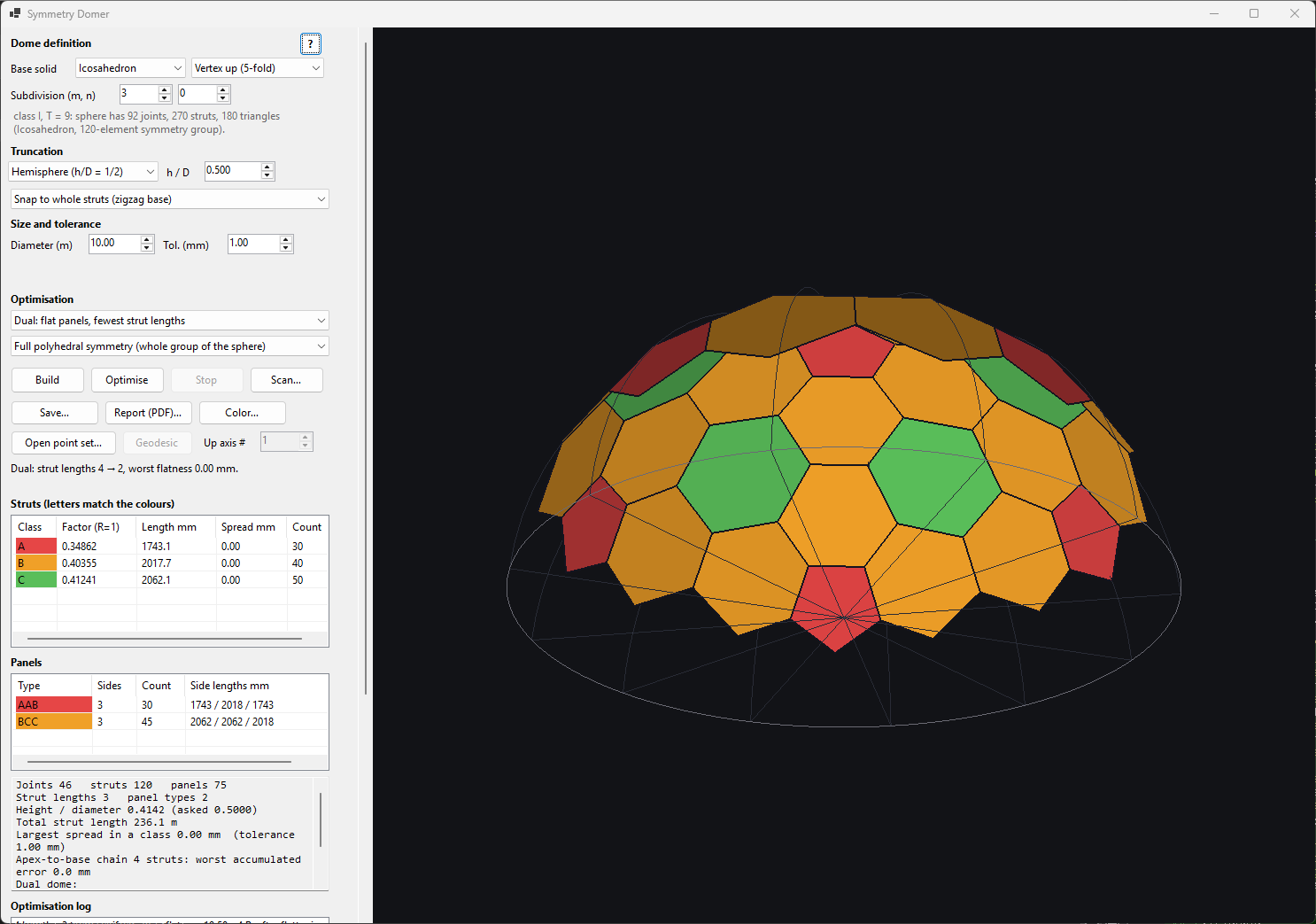
The objective dual builds the dual: one joint per triangle, one strut across every pair of adjacent triangles and one panel around every vertex (hexagons and pentagons for icosahedral domes). Such panels are not flat in general, so the optimiser first flattens them and then merges edge lengths. The result lists strut lengths, panel types and the worst out-of-plane distance in mm.
Family scan, point sets and champions
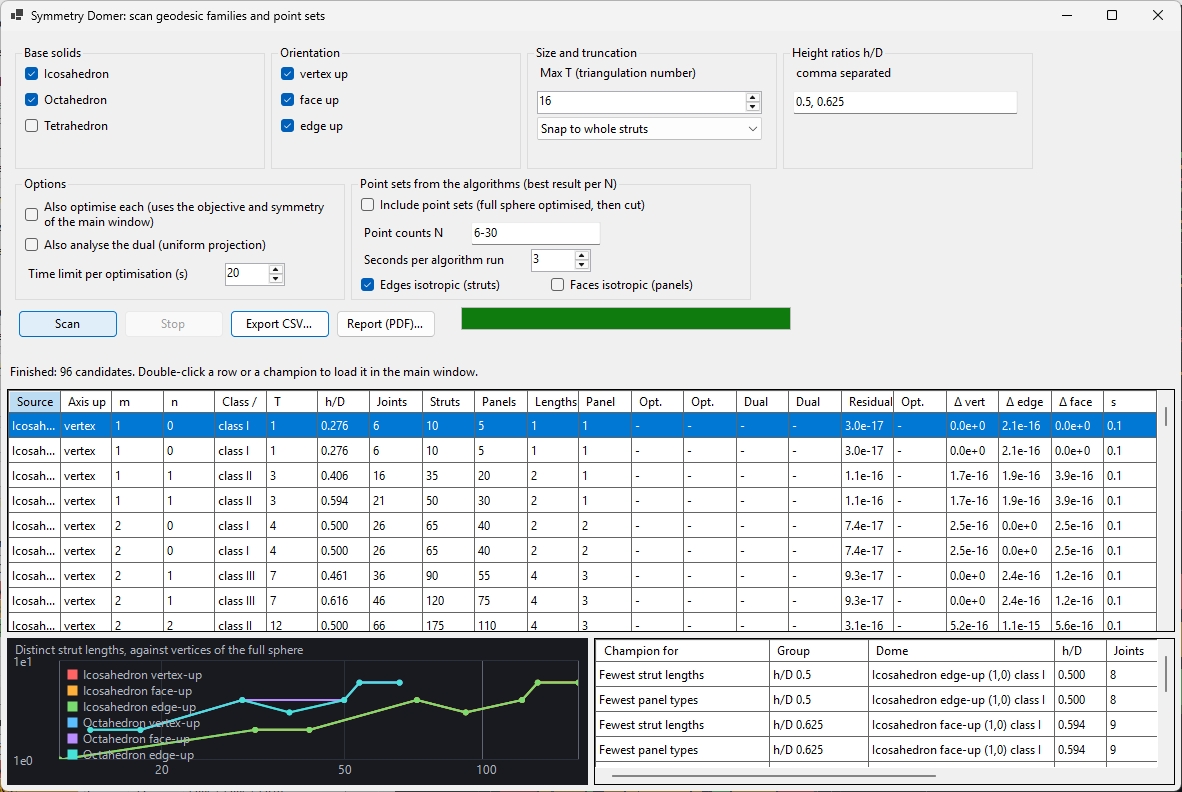
Scan… evaluates many dome candidates at the current truncation and tolerance and tabulates joints, struts, panels, distinct lengths and panel types, optionally the optimised counts and the dual. Export as CSV or PDF.
Sources
- Geodesic families – (base solid, axis, m, n) as before; they always stay in the scan.
- Point sets from the algorithms – for every N in the range the algorithms of Symmetry Mechanical are run (time limit per run) and one result per N is kept (best result per N only: the isotropic one with the fewest distinct edge lengths, otherwise the one with the smallest residual for the chosen mass models), the full sphere is optimised first, its hull triangulation is stood on each distinct symmetry axis (through a vertex, a face centre or an edge midpoint, one per symmetry orbit) and the orientation with the fewest strut lengths is cut at the requested h/D.
The fewest-lengths search
Besides the Mechanical algorithms the scan runs Fewest strut lengths (symmetric orbit recipes). A set that is a union of orbits of an irreducible point group (T, Th, Td, O, Oh, I, Ih) is isotropic in every mass model by symmetry, so the search can use all the remaining freedom to reduce strut lengths: for each N it enumerates recipes (orbits on the symmetry axes, orbits on mirror planes, general orbits), tunes the free positions so that nearly equal edge lengths become exactly equal (Levenberg–Marquardt, greedy merging), and keeps the isotropic set with the fewest distinct edge lengths of its hull triangulation. For N = 32 it finds the icosahedron + dodecahedron set (60 triangles, 2 lengths), the same as the Thomson minimum. When several algorithms deliver an isotropic set (residual below 1e-9) the scan keeps the one with the fewest distinct lengths; if none is isotropic it keeps the one with the smallest residual.
Mass models
Vertices are always included. Edges (a wire along every strut) are on by default because the struts of a dome are its edges; faces (a shell of panels) is optional and off by default. The solid model is not offered: a dome is not a filled body. The columns Δ vert / Δ edge / Δ face give the relative eigenvalue spread of the inertia tensor of the full sphere (0 = isotropic) for geodesic and point-set candidates alike, so both kinds of solution can be compared; they play no part in the ranking.
Champions
The champions table (right of the chart, and a page of the PDF) lists the best usable candidate per category: fewest strut lengths and fewest panel types for each h/D, fewest lengths per size band (joints), best after optimisation for each source, best dual for each h/D, and the Pareto front of lengths, joints and panel types. A candidate is usable when the cut reaches the requested h/D within 0.08 (snapping to whole struts can fall far short, leaving a tiny cap) and has at least six panels. Selecting a champion makes the chart show the quantity of that category (lengths, panel types, optimised lengths, dual lengths, or the isotropy residual) with the champion marked in gold. The last rows give the most isotropic full sphere of each source, the most isotropic after optimisation (merging strut lengths moves the joints off the exact symmetric positions, so the optimised sphere is no longer exactly isotropic), and the isotropy-versus-lengths Pareto front (residuals below 1e-9 count as exactly isotropic, so the front is about how few lengths an isotropic dome can have). The isotropy rows use the residual: the residual (norm of the inertia anisotropy and centre-of-mass offset over the selected mass models, 0 = isotropic), so geodesic spheres and algorithm point sets can be compared directly. Double-click a champion or a row to load that dome into the main window.
Coverage: which sizes each source can reach
A geodesic sphere exists only for particular vertex counts: 10T+2 for the icosahedron (12, 32, 42, 52, 62, 72, …), 4T+2 for the octahedron (6, 18, 38, 66, …) and 2T+2 for the tetrahedron, with T = m² + mn + n². A point set from the algorithms exists for every N. So when a point set and a geodesic sphere compete at the same N the geodesic sphere has the advantage of an exact, symmetric construction (it is isotropic to the arithmetic's rounding, about 1e-16), but between the geodesic sizes only the point sets can supply a dome at all. Compare the two sources at equal N, and treat the point sets as the way to fill the gaps.
Point sets in the main window
Open point set… loads a point file saved by the Mechanical app; Up axis # picks among the distinct axes of the kind chosen in the axis combo. Geodesic returns to the base solids. Everything else (truncation, tolerance, optimisation, dual, reports) works the same; the PDF additionally shows the triangulated sphere and the dual polyhedron.
Views and stereo
Views: Panels, Struts (coloured by class), Dual, and All (four panes with a bar chart of class counts). Drag with the left mouse button to rotate, wheel to zoom. The stereo group works like in Symmetry Explorer: red/blue anaglyph with adjustable depth, eye intensity and swap, designed for red–blue glasses on a dark or light background.
Gamepad
A gamepad works as soon as it is connected; there is nothing to configure. It only responds while the Symmetry Domer window is the active window. The four face buttons are called A, B, X and Y after their usual layout (A at the bottom, Y at the top); LB and RB are the shoulder buttons and LT and RT the triggers.
Outline colours: blue = view, red = dome definition and build, teal = windows (scan, help).
| Control | Action |
|---|---|
| Right stick | Orbit the dome (the same sense as dragging with the mouse). |
| Left stick up / down | Zoom in / out. |
| Left stick left / right | Decrease / increase the stereo Depth slider (when stereo is on). |
| D-pad up / down | m + / −. |
| D-pad right / left | n + / −. |
| A | Build. |
| X | Optimise. |
| B | Stop the optimisation. |
| Y | Stereo on / off. |
| LB | Wireframe on / off. |
| RB | Next view (Panels, Struts, Dual, All). |
| LT | Reset the view. |
| Start | Open the family scan. |
| Back (Select) | Open this help. |
Reports
Report (PDF)… writes the definition, summary, schematic top and side drawings, the strut list (letter, chord factor, length in mm, min, max, spread, count), the panel list (sides, corner angles), the optimisation log and the dual data. Save… writes the joints as a point file that Symmetry Explorer can open.
Command line
Symmetry.Domer.exe --solid 2 --axis 0 --m 4 --n 0 --ratio 0.5 --cut 0 --objective 0 --sym 0 --view 1 --stereo --wire --optimise --scan --report out.pdf. Combo-box flags take the zero-based index of the entry. All flags are optional; --optimise runs the optimiser at start and --report writes the PDF and exits. --scan-points 8-24 --scan-pdf scan.pdf runs the point-set scan headless and writes its PDF and a CSV next to it; optional --scan-algo s (seconds per algorithm run), --scan-opt s (turn optimisation on, seconds per optimisation), --scan-maxt T and --scan-vmin/--scan-vmax (only geodesic spheres with that many vertices).
Copyright and licence
Symmetry Domer © 2026 Joaquín Obregón Cobo. All rights reserved.
This version of Symmetry Domer is free to use, for any purpose, but it is not open source: it may not be redistributed or modified without permission, and it is provided as is, without warranty. Domer computes geometry only: any structure designed with it must be checked and approved by a qualified engineer. The full terms are in LICENSE.txt, next to the program.
Third-party software
Symmetry Domer uses OpenTK and its GLControl (MIT licence), the GLFW library (zlib licence) and QuestPDF for the PDF reports (QuestPDF Community License; QuestPDF includes Skia, HarfBuzz, FreeType, qpdf and other open-source components). Their copyright notices and licences are on the Licences page and in the Help\licenses folder.